
Bitget Trading Bot: Grid, DCA and Futures Bots Explained
Bitget offers grid, DCA, portfolio, trend and signal bots without a bot fee. Which bot fits which market, a Bitcoin grid example with today's price and Bitget's fees, why too many grids lose money and how to set up your first bot.


Which topics should we dive deeper into?
Select what genuinely interests you. Your picks feed directly into our editorial planning.
Crypto news that's actually worth your time.
Weekly. 60 seconds. Carefully curated by our editors: no hype, no promo flood, no spam.
A Bitget trading bot places buy and sell orders for you according to rules you set once: a grid bot trades a price range, a DCA bot buys in steps, a signal bot executes alerts from TradingView. Bitget offers grid, Martingale, auto-invest, portfolio, trend-following and signal bots, and according to its bot guide they cost nothing extra: you pay the normal trading fees, plus funding and interest where leverage is involved. The futures grid bot works on USDT-M perpetuals with leverage of up to 150x, which is also where the largest risk sits.
Bitget trading bots: the key facts
- Bot types: spot grid, futures grid, position grid, spot and futures Martingale, auto-invest, Smart Portfolio, trend-following, funding rate arbitrage and the futures signal bot.
- Cost: no bot fee; standard trading fees of 0.1 percent on spot and 0.02 or 0.06 percent on futures apply.
- Leverage: the futures grid bot allows up to 150x on USDT-M perpetuals.
- No coding: every Bitget bot is set up in a few clicks through a guided screen in the app or on the website.
- Change: Bitget discontinued its custodial Futures Martingale bots on 12 October 2026, according to its bot page.
This guide explains which Bitget trading bot fits which market, calculates a grid bot on Bitcoin with today’s price and shows why too many grids lose money to fees. Bots trade on the same spot and futures markets as manual orders, so the costs in our overview of Bitget fees apply to every bot order. Bitget is not listed in ESMA’s register of crypto-asset service providers authorised under MiCA, so this guide is for readers outside the EU in countries where Bitget operates.
Bitget bots for spot and futures: which one fits which market
Every bot follows one strategy, and every strategy has a market in which it works and one in which it fails. Bitget sorts its bots by trading goal:
| Your goal | Bitget bot | Market it is built for |
|---|---|---|
| Earn from prices moving up and down in a range | Spot grid, futures grid, position grid | Sideways, range-bound |
| Build a position step by step | Auto-invest, spot Martingale | Rising or fluctuating |
| Trade a range with leverage | Futures grid | Medium to high volatility |
| Hold several coins in fixed proportions | Smart Portfolio | Long-term, stable or rising |
| Follow indicators such as MACD or RSI | Trend-following bot, spot and futures | Trending, breakouts |
| Execute your own TradingView alerts | Futures signal bot | Any, signal-driven |
Bitget names the spot grid and the auto-invest bot as the easiest starting points. Both work without leverage, so a mistake in the settings costs time and fees, not a liquidated position.
A note on names: Bitget has no product called DCA bot. Its bot guide files auto-invest and the spot Martingale under DCA strategies, and the futures grid and futures Martingale under leveraged DCA and grid strategies. Anyone looking for a Bitget DCA bot will find the auto-invest bot closest to the classic idea of buying a fixed amount at regular intervals.
Grid trading on Bitget: how the Bitget grid bot works in spot and futures
A grid bot divides a price range into equal steps and places a buy order at every step below the current price and a sell order at every step above it. When the price falls one step, the bot buys; when it rises one step again, it sells that amount with a profit of one step. Each completed buy and sell pair is one grid round.
- Spot grid: trades coins you actually buy, without leverage. The worst case is holding Bitcoin bought at higher prices when the price leaves the range at the bottom.
- Futures grid: runs the same logic on USDT-M perpetuals, long, short or neutral, with leverage. Here the worst case is liquidation.
- Trailing grid: moves the range along when the price leaves it, available for both spot and futures grids.
- Position grid: sets range and grid count itself once you enter the amount.
How many grids? A Bitget grid bot example with Bitcoin
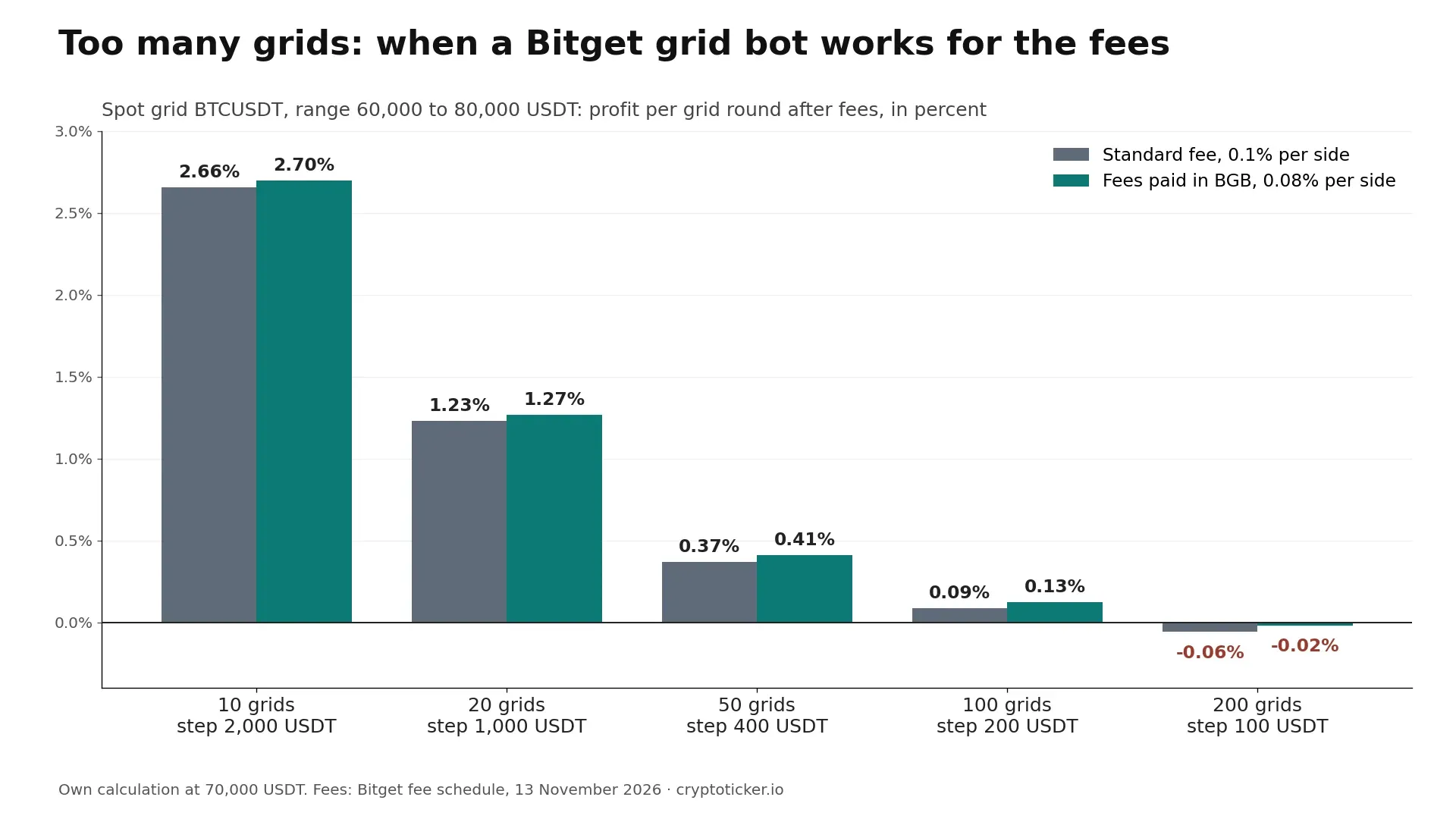
The example uses a spot grid on BTCUSDT, Bitcoin against the Tether stablecoin USDT, between 60,000 and 80,000 USDT, a range around the Bitcoin (BTC) price of about $68,970 on 13 November 2026 (CoinMarketCap, 20:01 UTC). Every grid round pays the spot fee twice, once for the buy and once for the sell: 0.2 percent in total at the standard level, 0.16 percent if you pay fees in BGB.
| Number of grids | Step size | Gross profit per round | After fees | After fees with BGB |
|---|---|---|---|---|
| 10 | 2,000 USDT | 2.86% | 2.66% | 2.70% |
| 20 | 1,000 USDT | 1.43% | 1.23% | 1.27% |
| 50 | 400 USDT | 0.57% | 0.37% | 0.41% |
| 100 | 200 USDT | 0.29% | 0.09% | 0.13% |
| 200 | 100 USDT | 0.14% | minus 0.06% | minus 0.02% |
Profit per round is measured at the middle of the range, 70,000 USDT. Above about 142 grids in this range, a round no longer covers the standard fees; with BGB the limit lies at about 178. More grids mean more rounds when the price moves little, fewer grids mean more profit per round when it moves a lot. A step of at least 0.5 percent of the price keeps the fee share below half of the gross profit.
A grid strategy earns most in a sideways market that swings back and forth inside the range. In volatile markets that break out of it, the grid either holds coins bought at higher prices or sits in USDT, unless a trailing grid moves the range along. The bot settings therefore follow the market conditions: a wide range and fewer grids for a nervous market, a narrower range and more grids for a calm one.
 Crypto trading bots compared
Bitget trading bot fees: what you pay
Bitget charges no subscription and no fee for the bot itself; only the Bitget trading fees apply. Every order the bot places is a normal trade, so the costs depend on the market the bot trades.
| Bot | Costs per order | Additional costs |
|---|---|---|
| Spot grid, spot Martingale, auto-invest, Smart Portfolio | Spot fee, 0.1% at the standard level, 0.08% with BGB | None |
| Futures grid, futures trend-following, futures signal bot | Futures fee, 0.02% maker and 0.06% taker | Funding every eight hours, paid between traders |
For grid bots the trading fee is the decisive cost, because they trade often and earn small steps. External bot services that connect to Bitget through an API usually charge their own subscription on top of the exchange trading fees; Bitget’s built-in bots avoid that layer.
How to set up a Bitget trading bot in five steps
The setup follows the same pattern for every bot type. The example is a spot grid, the starting point Bitget recommends for beginners.
| Step | What you do | What to watch |
|---|---|---|
| 1 | Open Trading bots in the app or on the website and choose Spot grid | Check which bots are offered in your country |
| 2 | Pick the pair, for example BTCUSDT | Liquid pairs fill grid orders more reliably |
| 3 | Set the lower and upper price and the number of grids | Keep each step well above 0.2 percent of the price |
| 4 | Enter the investment amount and the optional exit settings: stop-loss and take-profit | A stop-loss below the range limits the damage of a breakdown |
| 5 | Start the bot and follow it on the bot dashboard | You can stop it at any time; open positions are then settled at the market price |
Bitget lets you run several bots at the same time on different pairs, as long as your balance covers them. Before you go live, you can practice futures trading with simulated funds in Bitget demo trading, the exchange’s form of paper trading.
Bot copy trading on Bitget
If you do not want to choose the settings yourself, Bitget offers bot copy trading: according to Bitget, you follow trading bots created by elite bot traders. Your bot then runs with the same settings as the original. Before you copy one, check the price range and the leverage the bot uses, because they decide your risk.
Copying human traders instead of bots works through Bitget’s copy trading for futures and spot, explained in our guide to Bitget copy trading.
Risks of Bitget trading bots
A bot executes rules without hesitation, in good and in bad markets. Good risk management starts with four risks:
- The price leaves the range. Below the range a spot grid holds coins bought at higher prices; above it the bot has sold everything and stops earning.
- Leverage in futures bots. At 20x, a 5 percent move against a futures grid consumes its margin, even before maintenance margin and fees are counted. How leverage and liquidation work is explained in our guide to Bitget futures trading.
- Martingale logic. Buying more as the price falls lowers the average price but enlarges the position in a falling market.
- Past performance. The returns shown for bots and bot traders describe the past and are no guide to future results.
 Crypto exchanges compared
Built-in Bitget bot or external bot trading platform?
Bitget’s bots run inside the exchange, need no API key and cost nothing beyond the trading fees. Independent bot platforms connect to your exchange account from outside and add their own automated tools, usually for a monthly fee.
| Aspect | Built-in Bitget bot | External bot platform |
|---|---|---|
| Where it runs | Inside Bitget | On the provider’s servers; the bot connects through an API key |
| Cost | Bitget trading fees only | Subscription plus the exchange trading fees |
| Exchanges | Bitget only | Multiple exchanges in one dashboard, with all connected exchange accounts side by side |
| Strategies | Grid, Martingale, auto-invest, portfolio, trend, signal and funding rate arbitrage | Often custom strategies, AI bots and advanced trading terminals |
| Security | No key leaves the exchange | Depends on the API permissions you grant |
Our comparison of the best crypto trading bots lists both kinds with prices and supported exchanges.
Connect Bitget to an external bot: API key, permissions and exchange account
An external bot trades on your behalf through an API key that you create in your Bitget account. Bitget’s API documentation describes how a Bitget API key works and how to keep it safe:
- Create the key under API Key Management on the website. Each user ID can create up to 50 API key sets, according to Bitget’s current quick start guide.
- Grant only the API permissions the bot needs. Classic keys distinguish read-only access for querying data such as market data, trade, transfer and withdraw. A trading bot needs read and trade permissions; withdrawal permissions are never required, and Bitget only allows API withdrawals from a whitelisted IP address.
- Bind an IP address. Bitget strongly recommends linking the key to fixed IP addresses; if the provider publishes its server addresses, enter them there.
- Store the passphrase. You set it yourself, and it can neither be changed nor recovered: if you lose it, you delete the key and create a new one.
- Delete a leaked key at once. API key, secret key and passphrase together give access to your account, and the leak of any one of them can cost you assets.
Once the bot connects, your Bitget funds stay on the exchange and every bot order appears in your trading activity like any other order. You can still trade manually in the same connected Bitget account, but keep manual trading and the bot on separate pairs, or the two will get in the way of each other’s position management.
If you are still choosing an exchange, our crypto exchange comparison shows which platforms offer built-in bots and at what fees. New Bitget accounts can be opened through Bitget’s sign-up page with our referral code already filled in; the conditions of the welcome pack are on our Bitget referral code page.
Where you can use Bitget trading bots
Bitget’s bots are available to eligible users wherever Bitget accepts customers, with the limits that apply to the exchange as a whole:
- European Union: Bitget is not listed in ESMA’s register of crypto-asset service providers authorised under MiCA (version of 11 November 2026). EU readers find licensed exchanges in our comparison of regulated crypto exchanges.
- Excluded countries: Bitget’s Terms of Use exclude, among others, the United States, Canada, Singapore, Japan, Hong Kong, Germany, France and Austria.
- Australia: ASIC has warned investors that Bitget’s crypto futures are not licensed there. Australians use the spot bots: spot grid, auto-invest and Smart Portfolio.
Bitget trading bot: our assessment
Bitget’s bot range is broad and free to use, and the spot grid is a sensible way to automate a clear view: “Bitcoin will move sideways between two prices for a while.” The bot does not create that view, it only executes it. Compared with manual trading, a bot wins on discipline and trade execution: it places every order at the planned price, around the clock, without hesitating. Manual trading stays stronger when news moves the market, because a bot keeps following its rules even when the market conditions behind them have changed. The grid example shows where most of the work lies: choosing a range that fits the market and a step size that leaves enough after fees.
Start automating with a spot grid or auto-invest, a small amount and a stop-loss below the range, and leave futures bots for later. Bots with leverage can lose the full margin within hours. This guide explains how the bots work; it is not investment advice.
FAQ: Bitget trading bots
Partner links: some links on this page are partner links. If you become a customer through one of them, we may earn a commission at no extra cost to you. Selection, ratings and ranking are decided independently by our editorial team. Ethics and Independence · Ownership and Funding
Transparency note: This article was produced with the assistance of artificial intelligence. Figures and claims are based on the primary sources linked in the text. The feature image was generated with AI.
For later? Save this article and find it again in your profile.
Related articles
- Trade Anthropic stock: ANT perpetuals on Bitget, OKX and Kraken, long or short
- Spot trading explained: real coins without leverage and no liquidation price
- Cryptohopper review: the trading bot costs from $29 a month and holds no coins
- Bitget Futures Trading: Your First Trade, Leverage and Risk
- Bitget Demo Trading: Practice Futures With Virtual USDT
Which topics should we dive deeper into?
Select what genuinely interests you. Your picks feed directly into our editorial planning.
Crypto news that's actually worth your time.
Weekly. 60 seconds. Carefully curated by our editors: no hype, no promo flood, no spam.

November 7, 2026 7:38 PM

OKX Fees: Trading, Futures and Withdrawal Fees by Region
OKX charges 0.08 percent maker and 0.10 percent taker on spot and 0.02 or 0.05 percent on futures. All fee tiers, the rates in Europe, the US and Australia, withdrawal, SEPA and card fees, and a comparison with Bitget, Kraken and Coinbase.
November 7, 2026 6:58 PM

Bitget Fees: Spot, Futures and How BGB Lowers Them
Bitget charges 0.1 percent on spot and 0.02 or 0.06 percent on futures. All VIP levels, the BGB discount, funding and withdrawal fees, copy trading costs and a comparison with Bybit and OKX Australia.
November 3, 2026 7:58 AM

Crypto futures trading: perpetual futures explained simply
Crypto futures and perpetual futures explained: how futures trading works, what the funding rate really costs and which exchanges are licensed for it in the EU.
October 29, 2026 9:45 PM

How to Short Bitcoin in the Crash: Step by Step on Bitget and OKX
Bitcoin fell below $79,000 after the Binance hack. If you want to bet on falling prices or hedge, a short does exactly that. How it works on Bitget and, for EU readers, on OKX Europe, a worked example at tonight's price and the risks of shorting after a crash.
October 27, 2026 12:48 PM
Bloom trading bot: 9,408 SOL drained, what to watch now
The Telegram trading bot Bloom reports an outflow of 9,408 SOL from 49 addresses and points to a flaw in a third-party module. The provider promises reimbursement in full; the decisive question about the key remains open.
October 22, 2026 4:17 PM
Railway hack hits crypto bots and wallets: what to check and replace now
US host Railway reports possible access to its customers' secrets. For crypto bots and wallets that is particularly dangerous: analysts already count outflows of around $371,000.
October 17, 2026 7:31 PM

OpenAI agent used known seed phrases to reach 362 wallets: old test wallets are the weak point
An internal OpenAI model worked through publicly known recovery phrases and paid fees out of a wallet belonging to someone else. The damage was nil; the route of attack concerns anyone who has ever created a test phrase.

October 15, 2026 7:40 PM

$257.4 million in SHIB futures against $77.5 million spot: EU leverage stops at 2:1
SHIB futures turned over $257.4 million in 24 hours against $77.5 million on the spot market. That is a factor of 3.3, and for leverage Germany applies a hard ceiling.

October 15, 2026 1:34 PM

$489 million in liquidations in one hour: where your leverage breaks first
Forced closures wiped out around $489 million within one hour on 15 October 2026, more than half the daily total of $942 million. Our analysis of OKX futures market data shows why Ether was hit harder than Bitcoin.
October 14, 2026 4:17 PM

WhiteBIT Coin price at $78.68 after a 7.59 percent jump: what is behind it
WBT gains 7.59 percent within 24 hours to $78.68. Heavy trading volume and a positive month shape the move, while a specific trigger remains open.
September 24, 2026 4:28 AM

Crypto Trading Bots and Tax: What Applies With Thousands of Trades a Year
A bot turns one investment decision into hundreds of disposals, and the tax office counts every single one. This guide explains the holding period, FIFO, the exemption limit and the record-keeping duties, and what to set up before the bot makes its first trade.

September 3, 2026 11:37 AM

Standard Chartered Just Opened Institutional Bitcoin Trading in the UAE
Standard Chartered launches institutional Bitcoin and Ether spot trading in the UAE. Here is what it means for BTC and ETH prices right now.
August 22, 2026 1:27 PM

Binance Delists ICX, SCRT and STORJ: From August 21, One Door Closes After Another
Binance removes ICON, Secret and Storj from spot trading on September 3, 2026 at 03:00 UTC. The wind-down starts on August 21 with margin and direct purchase, and ICX holders face a second deadline through the ICON shutdown.
August 20, 2026 1:28 PM

Crypto Trading Bots: How They Work, What They Cost and When They Pay Off
A crypto trading bot trades around the clock to fixed rules, and every one of those rules costs a fee. This guide works the costs through over twelve months, sets out the German tax position under Section 23 EStG and shows when a provider needs a BaFin licence.
August 18, 2026 4:26 PM
Binance Delisting on August 17: ACX, HFT, PIVX, PYR, VANRY and VIC Leave Spot Trading
Binance removes six tokens from spot trading entirely at 03:00 UTC on August 17, 2026. Anyone holding ACX, HFT, PIVX, PYR, VANRY or VIC has to choose between selling before Monday and withdrawing by October 17.
May 31, 2026 12:25 PM
HYPE Token Hits $70 All-Time High: 4 Reasons for the Surge
Hyperliquid ($HYPE) hit a $70 all-time high, entering the top 10 cryptos. Here are the regulatory changes and revenue fundamentals driving the pump.
April 18, 2026 5:45 PM
RAVE Token Crash: 4,000% Rally Ends in Violent Dump – What Traders Got Right
RAVE token crashes after a 4,000% rally. Full chart analysis, key levels, and how traders can short or trade RAVE.
April 15, 2026 12:00 PM

Bitcoin Price Corrects After $76,000 High: Is This a Consolidation or a Crash?
Bitcoin price faces a healthy correction after hitting $76,000. Learn how to trade consolidation phases and use support and resistance levels effectively.
April 13, 2026 6:10 PM
RAVE Token Surges 4,000%: What is RaveDAO and How to Trade It?
RAVE token skyrocketed over 4,000% in 7 days. Learn what RaveDAO is and follow our guide to trade RAVE on Bitget today.
March 27, 2026 9:53 PM
OpenClaw AI Trading 2026: Can AI Trading Really Make You Money?
AI trading agents like OpenClaw are trending, but a $441,000 error and a 62% loss by GPT-5 reveal the brutal reality of autonomous crypto bots in 2026.

December 22, 2025 11:00 PM
Bitget Launches Gold, Forex and Commodities Markets for Crypto Users
Bitget announced the launch of a new cross-market feature that gives crypto users direct access to global forex, metals, commodities, indices, and stock CFDs using USDT as margin.
December 6, 2025 11:00 PM
Bitget Stock Futures Break Through $10 Billion as Global Traders Rush Into Tokenized Equities
Bitget, the world’s largest Universal Exchange (UEX), today announced that its US stock futures have surpassed $10 billion in cumulative trading volume.
November 24, 2025 12:08 PM
OKX Trading Bots 2025: Earn Rewards Automatically With the New Bot Campaign
OKX launches a bot campaign with multiple BTC rewards for generated trading volume. Learn how trading bots work and follow a full step-by-step OKX bot setup guide.

More from CryptoTicker