
How to Add RPC Networks and Send Crypto From Metamask
Guide to adding RPC networks like Arbitrum and Optimism to MetaMask for secure crypto transfers and smart contract interactions.


Which topics should we dive deeper into?
Select what genuinely interests you. Your picks feed directly into our editorial planning.
Crypto news that's actually worth your time.
Weekly. 60 seconds. Carefully curated by our editors: no hype, no promo flood, no spam.
MetaMask is a versatile wallet that supports Ethereum and other EVM-compatible blockchains. This guide will help you add various networks, including Arbitrum, Optimism, and Injective, ensuring a broad range of capabilities for your MetaMask wallet.
Installing and Setting Up MetaMask
- Download MetaMask: Visit the official MetaMask website and download the extension for Chrome, Firefox, Opera, Brave, or as a mobile app for iOS and Android.
- Install the Extension: For Chrome, click “Download for Chrome” and then “Add to Chrome”.
- Create or Import a Wallet: After installation, click “Get Started”. You can either import your existing wallet using a seed phrase or create a new wallet.
- Secure Your Wallet: If creating a new wallet, set a strong password. Note down your seed phrase securely and never share it with anyone.
- Confirm Seed Phrase: Verify your seed phrase by selecting the words in the correct order.
How to add RPC Networks to MetaMask
Adding RPC Networks Manually Using Metamask
You can add an unlimited number of networks, including mainnet and testnet options, to your MetaMask wallet.
How to add Arbitrum?
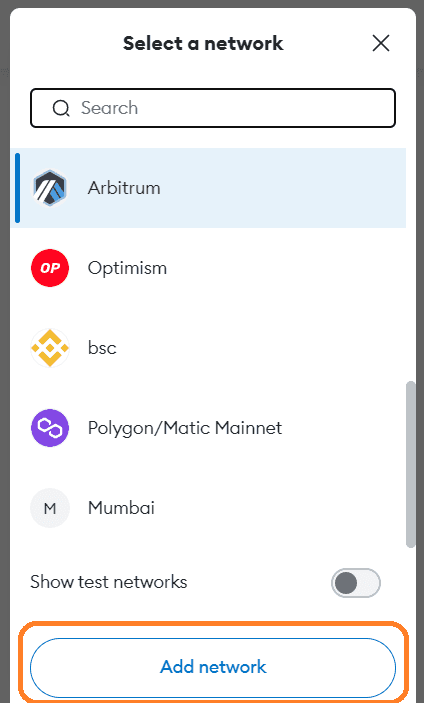
1. Access Network Settings: Open MetaMask, click the network dropdown menu near the logo.
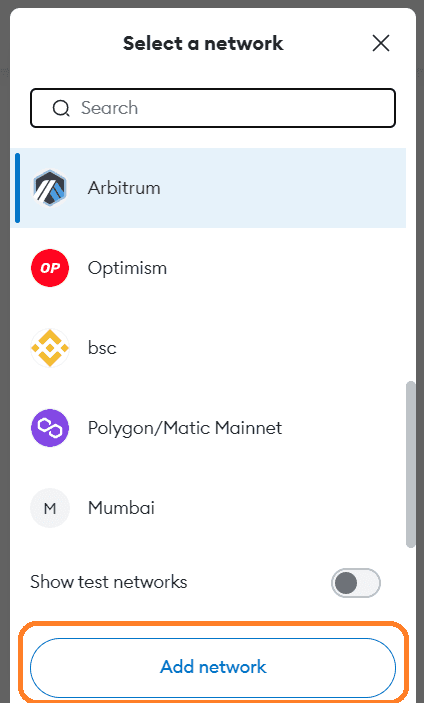
2. Add Network Details: Click “Add Network” and enter the following details for Arbitrum:
- Network Name: Arbitrum One
- New RPC URL:
https://arb1.arbitrum.io/rpc - Chain ID: 42161
- Currency Symbol: ETH
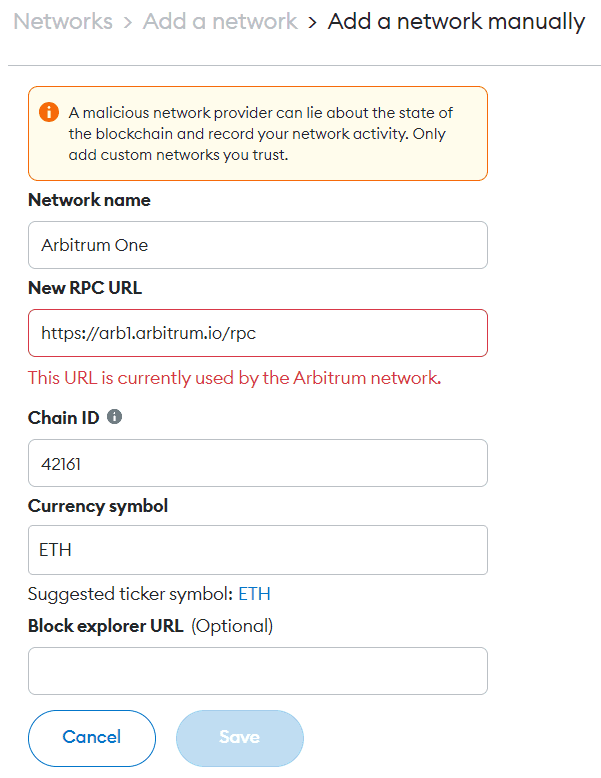
3. Save and Use Arbitrum: Click “Save”. You can now use the Arbitrum network.
- If you haven’t installed Coinbase Wallet, do so and set up your account.
- Open the Coinbase Wallet extension and view your balance.
- Select “Receive” to find your Arbitrum address.
- Copy the Arbitrum address.
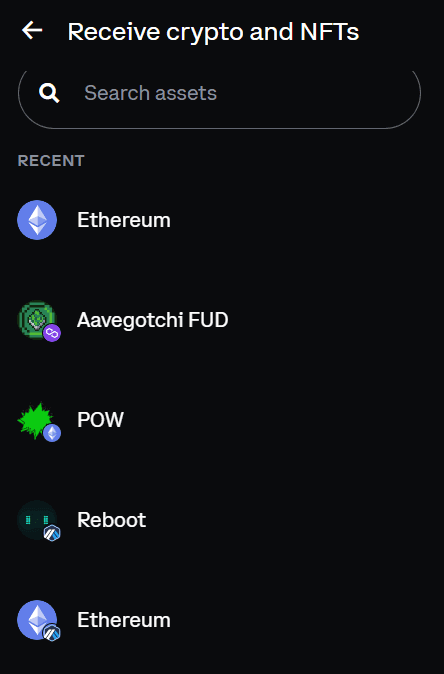
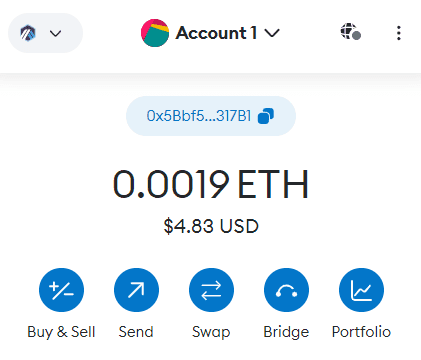
- Access your MetaMask Wallet extension and log in.
- Ensure you’re on the Arbitrum network; switch to Arbitrum Mainnet if necessary.
- Click “Send”.
- In the “Send To” window, paste the Coinbase Wallet address.
- Enter the amount of ETH you want to send.
- Proceed by clicking “Next”.
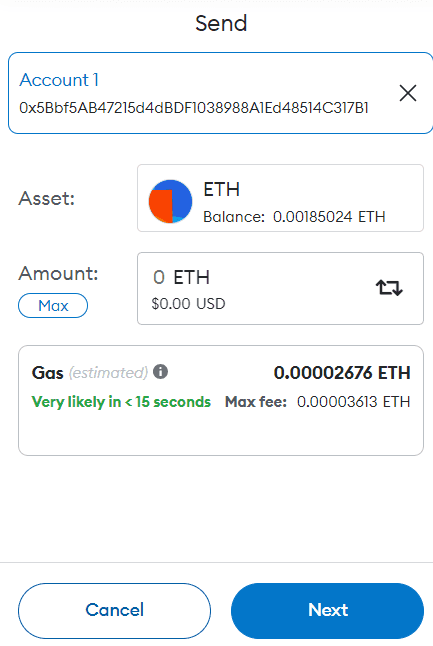
- Review the recipient address, gas fee, and transfer amount on the confirmation page.
- Confirm the transaction.
- In MetaMask, check recent transfers under the “Activity” tab.
- In Coinbase Wallet, view recent transactions via the transaction icon.
How to add Optimism?
1. Access Network Settings: In MetaMask, click the network dropdown menu.
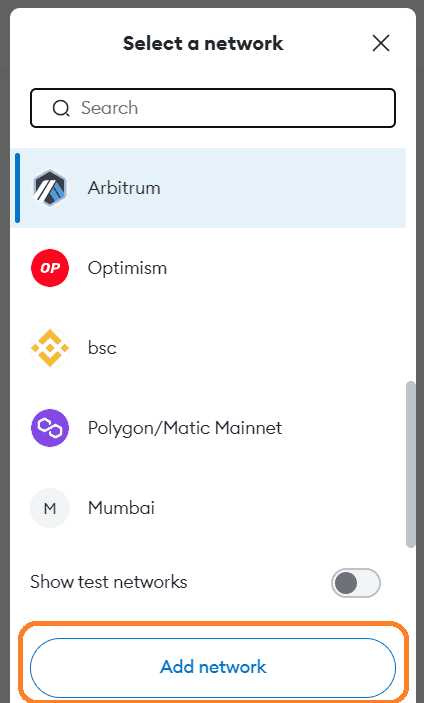
2. Add Network Details for Optimism:
- Network Name: Optimism
- New RPC URL:
https://mainnet.optimism.io - Chain ID: 10
- Currency Symbol: ETH
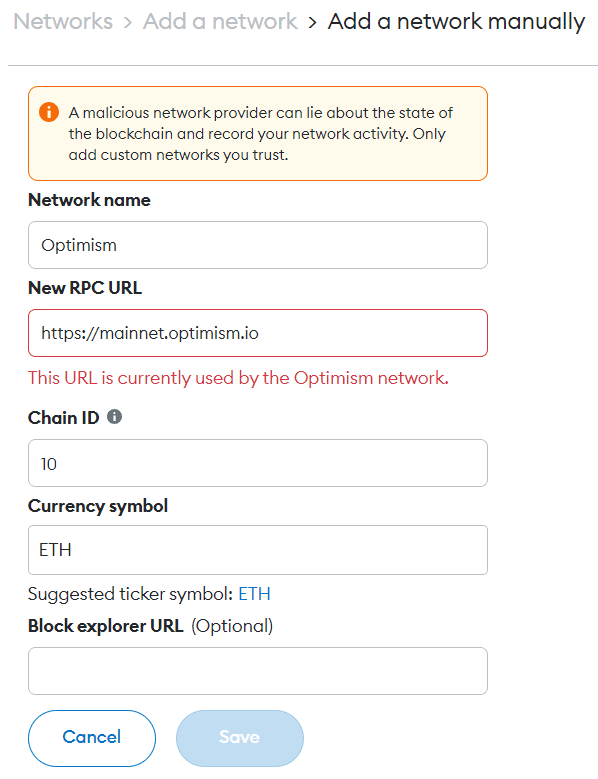
3. Save and Use Optimism: Click “Save” to start using the Optimism network.
- Log into your Kraken account.
- Navigate to the deposit section and select Ethereum (ETH).
- Copy the ETH deposit address provided by Kraken.
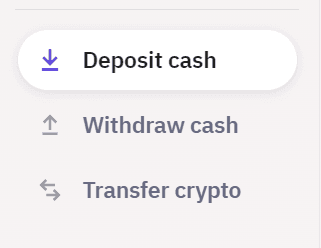
- Open your wallet that holds your Optimism-based ETH.
- Ensure that your wallet is connected to the Optimism network.
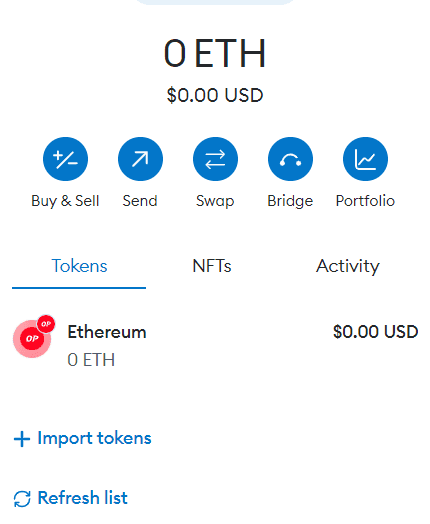
- In your Optimism wallet, select the option to send or transfer funds.
- This action typically involves clicking a “Send” or “Transfer” button.
- Paste the Kraken deposit address into the recipient field.
- Enter the amount of ETH you wish to send to Kraken.
- Review any transaction fees that may apply and adjust the amount if necessary.
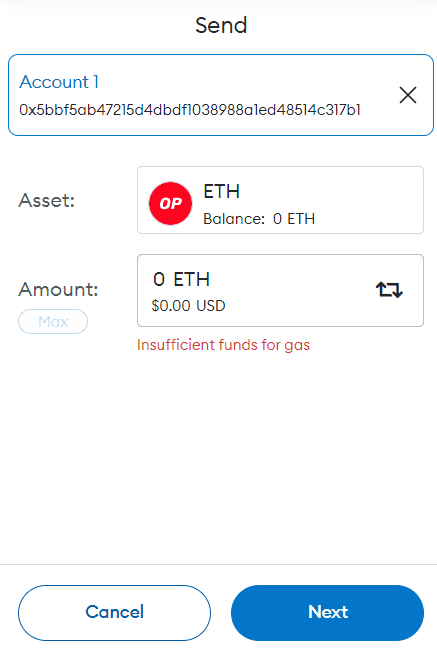
- Double-check the details, especially the Kraken deposit address.
- Confirm the transaction in your Optimism wallet.
- The transaction will be processed, and the ETH will be sent to your Kraken account.
- Log back into your Kraken account after the transaction.
- Check your balance or transaction history to confirm the receipt of ETH.
How to add Injective?
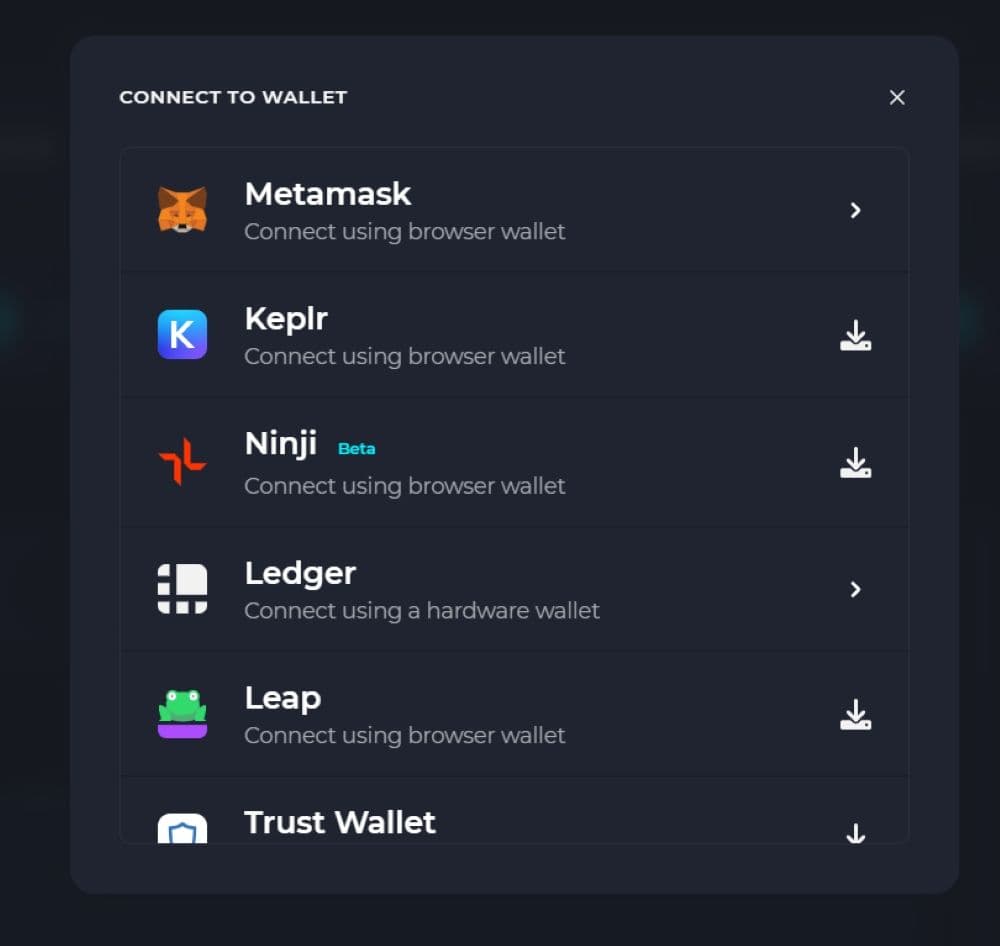
To connect MetaMask to Injective, follow these steps:
- Navigate to the Injective Network Hub website.
- Click ‘Connect’ at the top of the page.
- Select ‘MetaMask’ from the available options.
- MetaMask will automatically link to the Injective network, creating a unique ID tied to your EVM wallet address.
How to add Avalanche?
1. Access Network Settings: Open MetaMask, click the network dropdown menu near the logo.
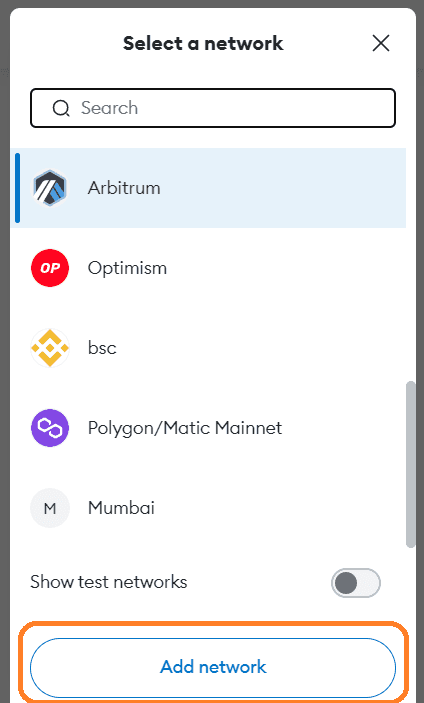
2. Add Network Details: Click “Add Network” and enter the following details for Avalanche:
- Network Name: Avalanche C-Chain
- New RPC URL:
https://api.avax.network/ext/bc/C/rpc - Chain ID: 43114
- Currency Symbol: AVAX
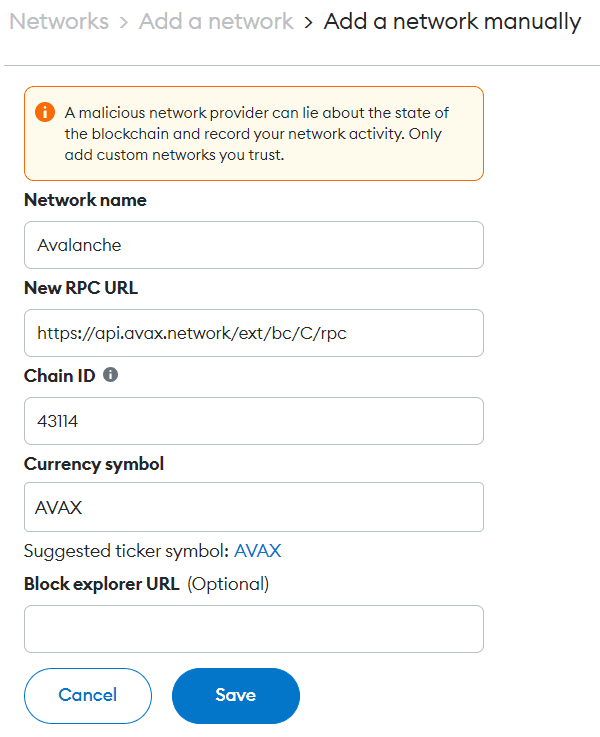
3. Save and Use Avalanche: Click “Save”. You can now use the Avalanche.
- Sign in to your Binance account.
- Go to the ‘Funds’ or ‘Wallet’ section and select ‘Deposit’.
- Choose AVAX (Avalanche) from the list of cryptocurrencies.
- Copy the AVAX deposit address provided by Binance.
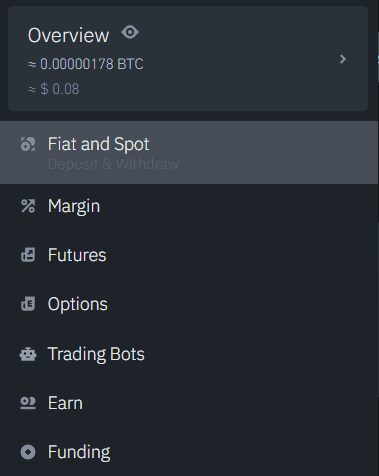
- Open the wallet where your AVAX tokens are stored.
- Ensure that your wallet supports AVAX and is connected to the Avalanche network.
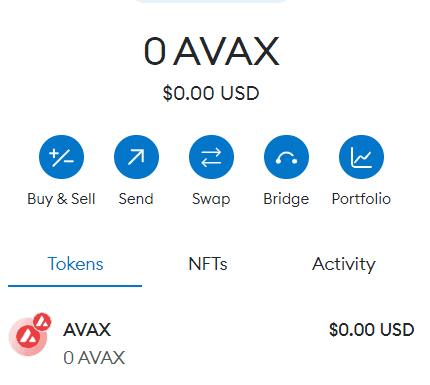
- Find and click on the “Send” or “Transfer” option in your AVAX wallet.
- This action typically involves selecting a button or tab within the wallet interface.
- Paste the Binance AVAX deposit address into the recipient field.
- Specify the amount of AVAX you want to send to Binance.
- Be mindful of any network fees and adjust the sending amount if necessary.
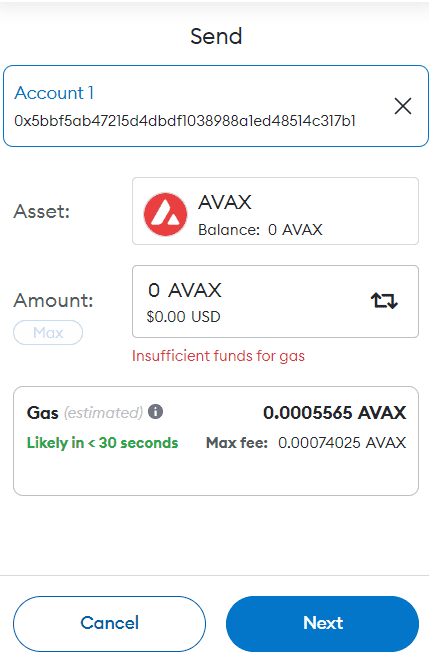
- Double-check all the details, especially the Binance deposit address.
- Confirm the transaction within your AVAX wallet.
- The transaction will then be processed, and the AVAX will be sent to your Binance account.
- Log back into your Binance account after some time.
- Check your AVAX balance or review your transaction history to confirm the deposit.
How to add Binance Smart Chain?
1. Access Network Settings: Open MetaMask, click the network dropdown menu near the logo.
2. Add Network Details: Click “Add Network” and enter the following details for Binance Smart Chain:
- Network Name: Binance Smart Chain
- New RPC URL:
https://dry-purple-forest.bsc.quiknode.pro/83528916be057ba132db188808697bf7cd64232d/ - Chain ID: 56
- Currency Symbol: BNB
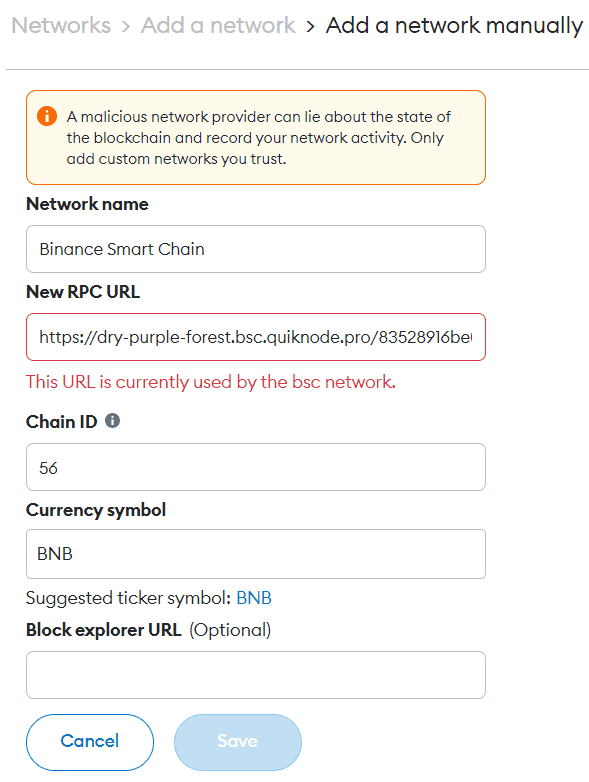
3. Save and Use Binance Smart Chain: Click “Save”. You can now use the Binance Smart Chain.
How to add Polygon Mainnet?
1. Access Network Settings: Open MetaMask, click the network dropdown menu near the logo.
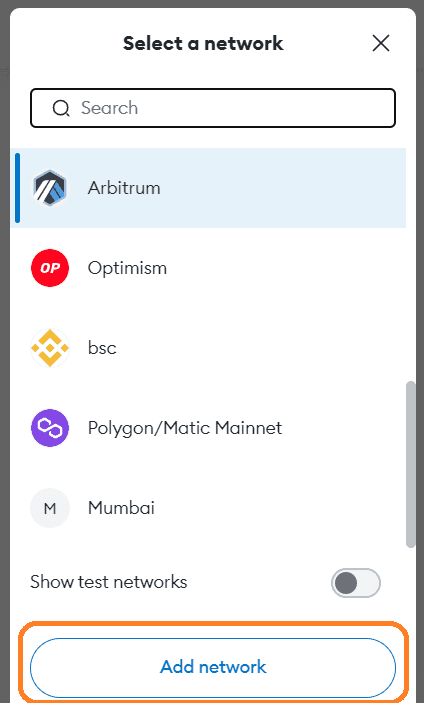
2. Add Network Details: Click “Add Network” and enter the following details for Polygon Mainnet:
- Network Name: Polygon Mainnet
- New RPC URL:
https://polygon-rpc.com - Chain ID: 137
- Currency Symbol: MATIC
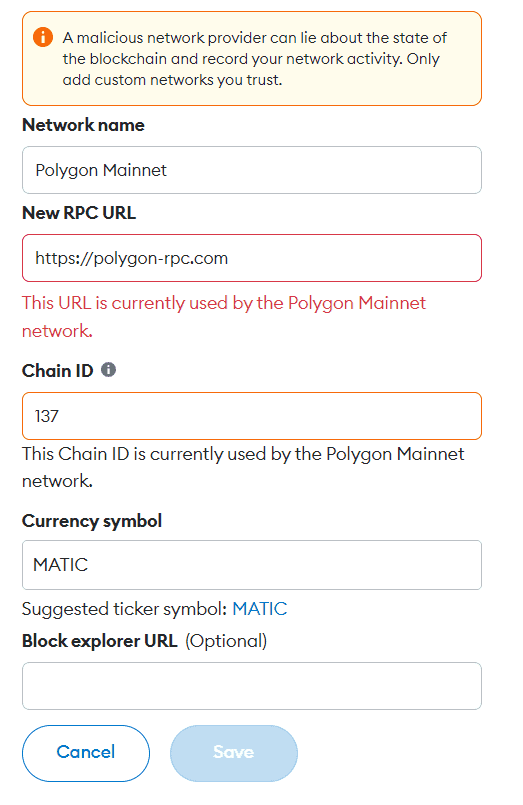
3. Save and Use Polygon: Click “Save”. You can now use the Polygon Mainnet.
- Log into your eToro account.
- Go to the ‘Portfolio’ section.
- Locate or add MATIC (Polygon) to your portfolio.
- Choose the option to deposit MATIC and copy the provided deposit address.
- Open the wallet where your MATIC is stored.
- Ensure that your wallet is connected to the Polygon network.
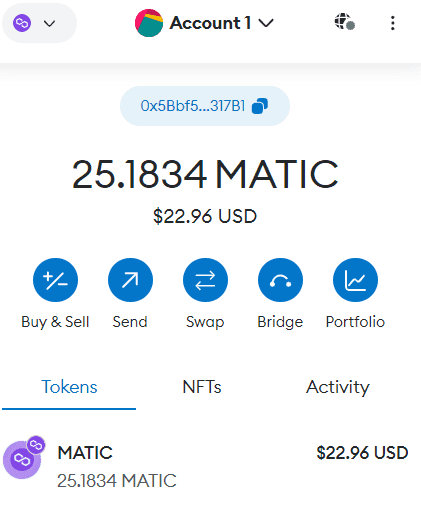
- Select the “Send” or “Transfer” option in your MATIC wallet.
- This action is usually initiated by clicking a button or tab within the wallet.
- Paste the eToro MATIC deposit address into the recipient field of your wallet.
- Specify the amount of MATIC you want to send to eToro.
- Take note of any network fees and adjust the sending amount accordingly.
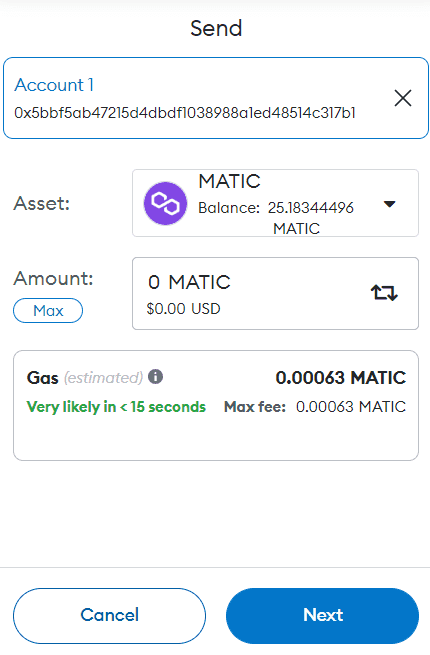
- Double-check all details, especially the eToro deposit address.
- Confirm the transaction in your Polygon network wallet.
- The MATIC will then be sent to your eToro account.
- After the transaction, log back into your eToro account.
- Check your MATIC balance or review your transaction history to confirm the deposit.
How to add Linea?
1. Access Network Settings: Open MetaMask, click the network dropdown menu near the logo.
2. Add Network Details: Click “Add Network” and enter the following details for Linea:
- Network Name: Linea
- New RPC URL: https://linea.blockpi.network/v1/rpc/public
- Chain ID: 59144
- Currency Symbol: ETH
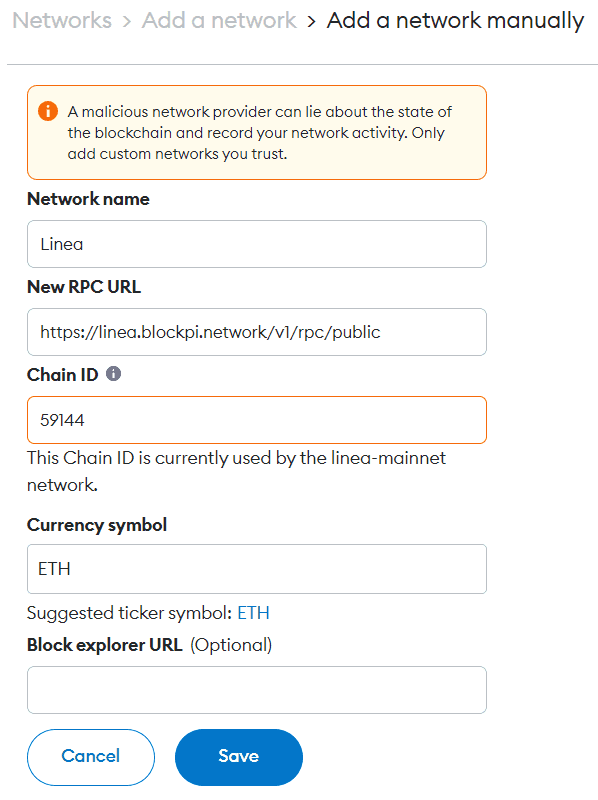
3. Save and Use Linea: Click “Save”. You can now use the Linea.
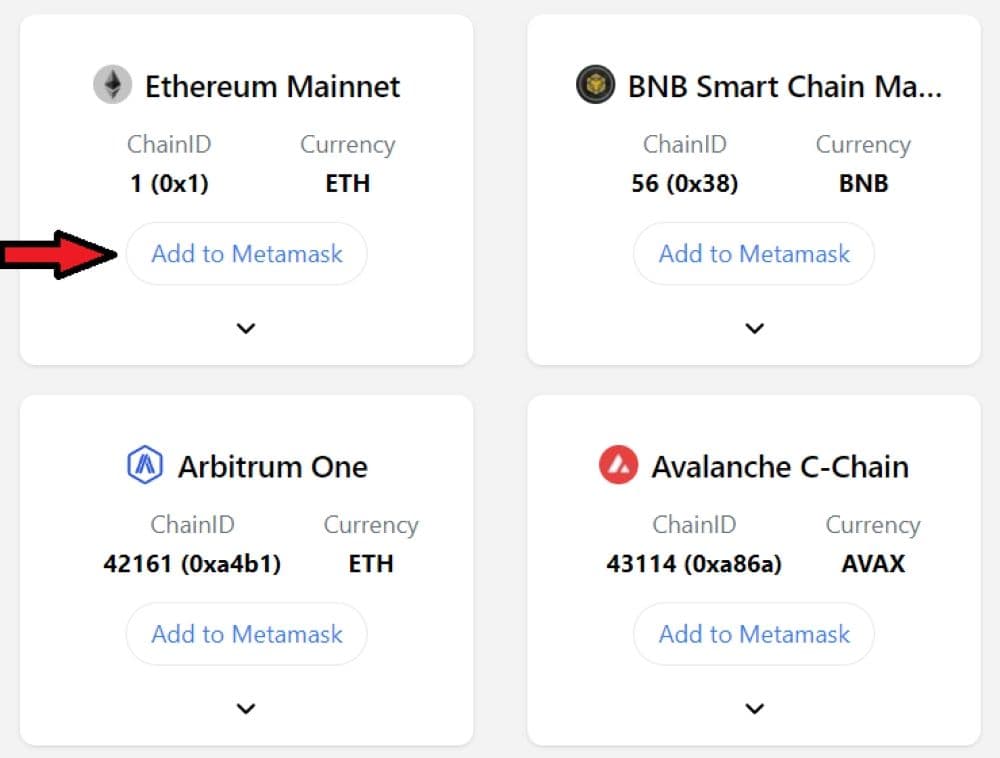
Using ChainList to Add Networks
ChainList is a convenient platform for adding custom networks to MetaMask:
- Visit ChainList: Go to the ChainList website.
2. Sync MetaMask with ChainList: Connect your MetaMask wallet to ChainList.
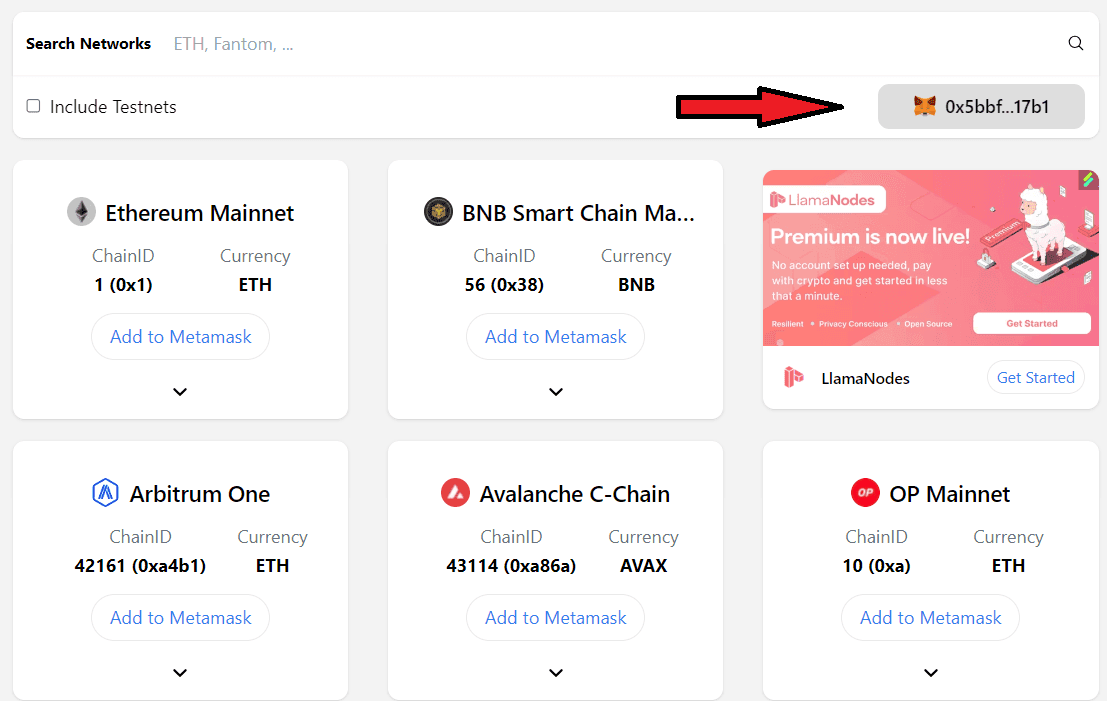
3. Search for Networks: Use the search function to find the network you want to add.
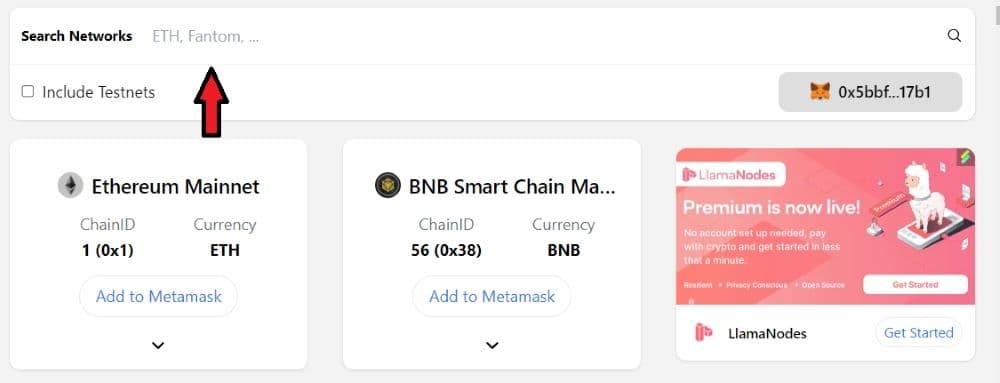
4. Connect Wallet: Click ‘Connect Wallet’ for the chosen network to add it to MetaMask.
Finding the Right Contract Address
To avoid losing funds, always verify the contract address from the project’s official website or trusted sources like Etherscan, Polygonscan or Arbiscan.
How to Find an Ethereum Contract Address
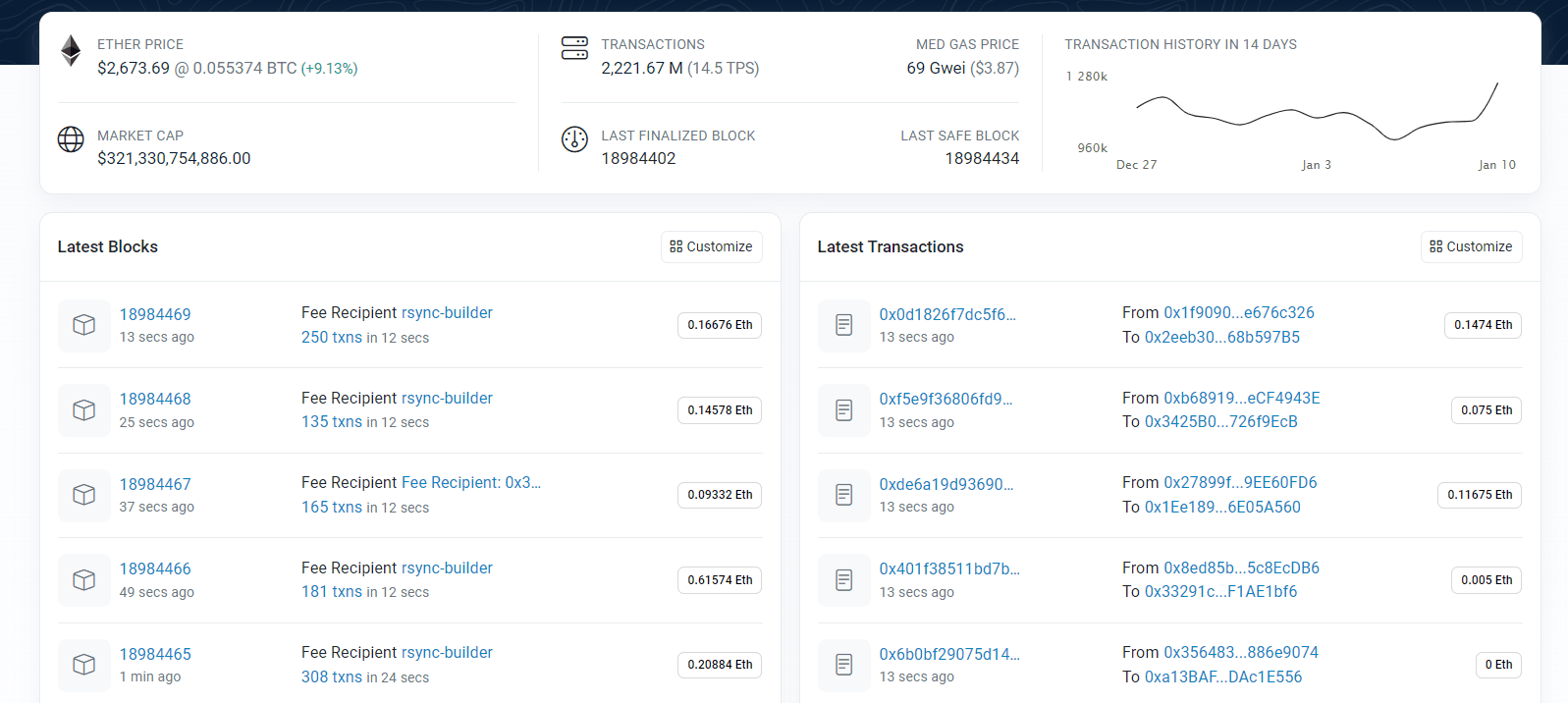
A block explorer is a web-based application enabling users to browse and search the Ethereum blockchain for various activities, including transactions, addresses, tokens, and current prices. Etherscan stands out as the most widely used block explorer for Ethereum. These platforms are useful for locating contract addresses, which can be done by searching for either the decentralized application (dApp) or the contract directly.
Most Ethereum wallets compatible with ERC-20 tokens, such as MetaMask, Trust Wallet, or MyEtherWallet, typically provide the contract addresses for the tokens they support. If you hold a particular token in your wallet, you’ll often find its contract address displayed within the wallet’s user interface.
Numerous decentralized applications (dApps) and token projects list their contract addresses on their official websites. These addresses can typically be found in sections such as the FAQ, at the bottom of the homepage, or within the documentation area of the site.
Individuals with technical expertise have the option of employing developer tools and Web3 platforms for a more direct method of locating and engaging with Ethereum contract addresses. Covalent, for instance, offers powerful APIs that facilitate the querying of blockchain data, which includes the discovery of contract addresses.
Practical Uses of Ethereum Contract Addresses
Prior to sending or receiving ERC-20 tokens, which are the standard format for tokens based on the Ethereum blockchain, it’s crucial to confirm the token’s authenticity by verifying its contract address. This step helps ensure that you are interacting with the genuine token and not a fake one.
When engaging with decentralized applications (dApps), being aware of the contract address is essential for direct interaction with the smart contract. This knowledge is particularly useful for various activities, such as executing trades, engaging in decentralized finance (DeFi) protocols, or utilizing a decentralized exchange (DEX).
For developers, the comprehension and utilization of contract addresses are fundamental aspects. Each time a new contract is deployed on the Ethereum blockchain, it generates a unique address. It’s crucial for developers to record this address for any subsequent interactions with the contract.
Key Considerations and Safety Tips
- Always double-check addresses: Given the irreversible nature of transactions on the blockchain, it’s imperative to verify the accuracy of the contract address you’re interacting with to avoid any irreversible errors.
- Beware of scams: In the realm of cryptocurrency, phishing and scams are common threats. It’s crucial to use contract addresses obtained only from reliable and trusted sources to ensure safety.
- Understand gas fees: Engaging with Ethereum contract addresses necessitates the payment of gas fees, and these fees can fluctuate depending on the level of network congestion.
Using Rainbow Wallet
- Rainbow Wallet: For Ethereum-based tokens, If you want to experience to use a New crypto wallet consider using Rainbow Wallet.
Conclusion
In conclusion, this comprehensive guide has equipped you with the necessary knowledge to expand the functionality of your MetaMask wallet by adding various networks like Arbitrum, Optimism, Injective, Avalanche, Binance Smart Chain, Polygon Mainnet, and Linea. Each step, from installing and setting up MetaMask to adding these networks, has been meticulously detailed to ensure a seamless experience.
Moreover, the guide has provided practical insights into transferring assets like ETH and AVAX to popular platforms such as Coinbase, Kraken, Binance, and eToro, highlighting the importance of accurate transaction details and network-specific procedures. Additionally, it has emphasized the significance of locating and verifying contract addresses, a crucial step in safely interacting with ERC-20 tokens, dApps, and smart contracts.
The guide also touched upon the practical uses of Ethereum contract addresses, key considerations for safe transactions, and introduced the Rainbow Wallet as an alternative for managing Ethereum-based tokens. Overall, this guide serves as a valuable resource for both novice and experienced users looking to navigate the diverse landscape of blockchain networks and ensure secure, efficient management of their digital assets using MetaMask.
Related articles
- How to add Avalance (AVAX) to MetaMask?
- Blockchain Brunch: The Place to Meet Berlin’s Blockchain Ecosystem of Entrepreneurs
- Ethereum Price Forecast 2023: 5 Reasons ETH Could Hit $3000 in 2023
- How to Add Binance Smart Chain to Metamask?
- Crypto Basics – Don’t know What Ethereum crypto is? Here’s a Complete Guide
Which topics should we dive deeper into?
Select what genuinely interests you. Your picks feed directly into our editorial planning.
Crypto news that's actually worth your time.
Weekly. 60 seconds. Carefully curated by our editors: no hype, no promo flood, no spam.

November 7, 2020 1:31 PM

Ethereum 2.0 Will Create The Next Economic Shift: Analyst Cochran
A report about the predictions made for Ethereum 2.0 by the prominent crypto-analyst Adam Cochran as to how it will cause the next economic shift.

August 30, 2020 8:16 AM
What is Binance Smart Chain?
In April 2020, Binance announced its new Binance Smart Chain. This new blockchain will work in parallel with the exchange’s primary blockchain, the Binance Chain. Both chains are being improved at exceptional speed. This post will take you through a […]
July 15, 2020 3:18 AM

Ethereum 2.0 May Launch By Nov 2020 or Jan 2021, Core Devs Reveal
In an Ask Me Anything (AMA) session hosted by Ethereum core developers on Reddit on Jul 10, it was revealed that Ethereum 2.0 Phase 0 may launch either by Nov 2020 optimistically or Jan 2021 realistically. The timeframe has been […]
February 13, 2020 4:18 PM
Top 3 Ethereum Mining Pools
Ethereum is one of the most popular cryptocurrencies. There are many advanced features which make this coin as one of the best coins to invest. The Ethereum miner is a person that dedicates time and power to classifying through blocks. […]
March 20, 2024 6:12 PM
Breaking Ethereum News: Ethereum Foundation Under State Investigation? ETH Price To Crash?
The investigation appears to have stemmed from a GitHub commit. Let's take a look at this Ethereum news article in more detail.
February 27, 2024 7:54 AM
Breaking News: Blast TVL Hits $2B, Blast Mainnet Launch On Feb. 29
The eagerly anticipated Blast mainnet launch is set to take place on the rare date of February 29th, a leap forward for the ecosystem.

August 26, 2023 12:52 PM
Is Cardano DEAD? Ethereum Fans claim THIS New Chain will Replace Cardano
Within a few months of its introduction, Base protocol has accrued a TVL of $185 million. Is Cardano dead?
July 8, 2023 2:55 PM

Which Crypto Network was the MOST Hacked? You’ll know the answer…
Which crypto network was the most hacked and why did this happen? In this article, we analyze why hackers targeted a specific network.
June 9, 2023 3:50 PM

BLOCKCHANCE 2023: Get your Discounted Tickets TODAY! Here’s How…
BLOCKCHANCE, Europe's premier blockchain conference, is all set to take the stage once again, scheduled from July 7th to July 9th, 2023 in Germany.
November 19, 2022 8:52 AM

What Are Investment DAOs? : Four Investment DAOs You Should Know
This article is all about the top four investment DAOs you should know. Let's take a look at it in more detail.

November 16, 2022 11:56 PM
Cardano News Ticker – CryptoTicker
Cardano is a delegated Proof of Stake blockchain (dPoS), that supports smart contracts similar to Ethereum. Get all the news here.
September 12, 2022 9:17 AM
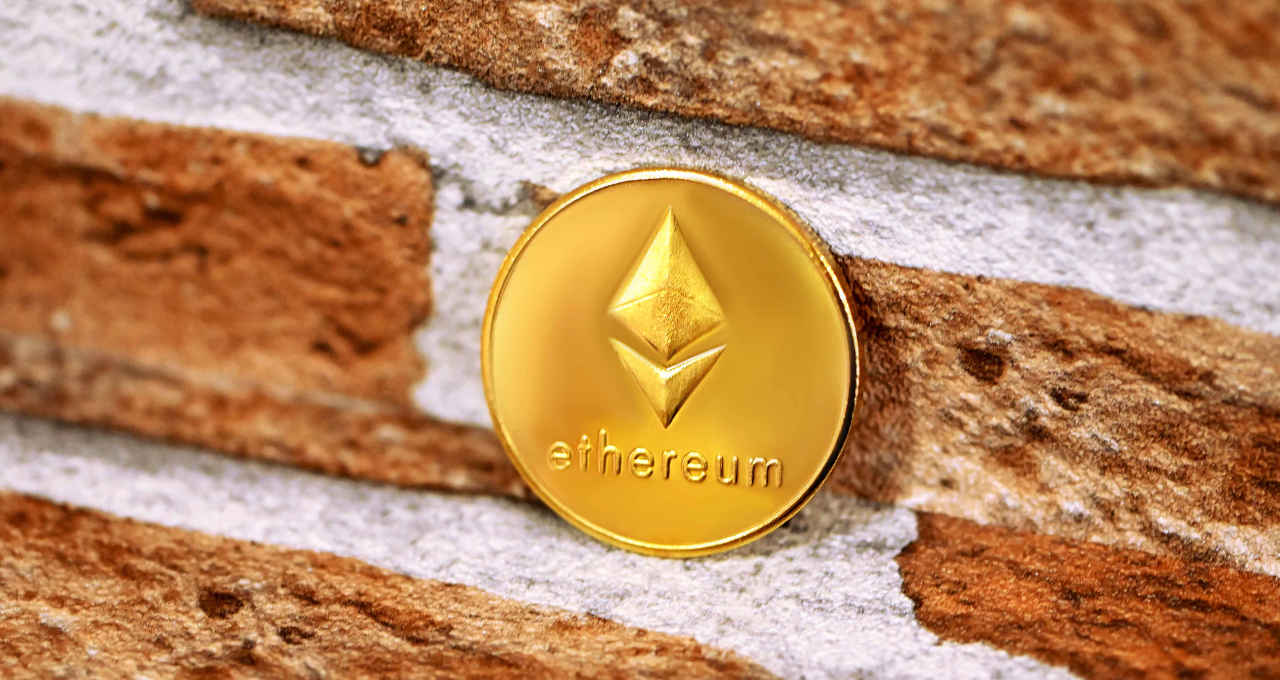
Ethereum Proof-of-Stake Merge Countdown! What is Ethereum Merge? : The Ultimate Guide
In this article, we’re going to talk about what is the Ethereum Proof-of-Stake Merge, the countdown, and other necessary details.
April 26, 2022 2:22 AM
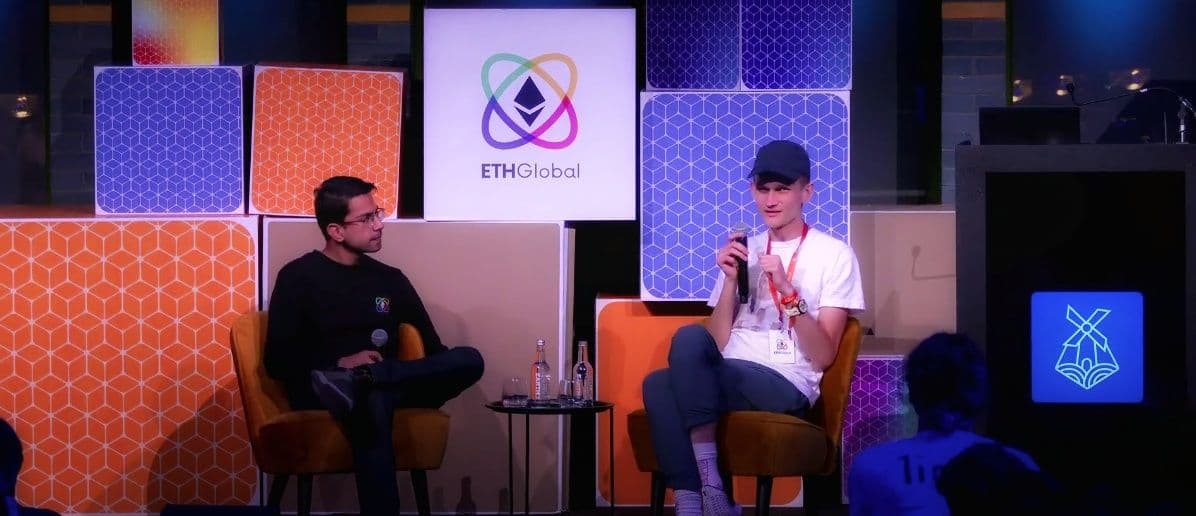
ETHAmsterdam Digest: THIS is what Vitalik thinks about Ethereum Today
ETHGlobal hosted the very first in-person conference that took place in Amsterdam, hence the name ETHAmsterdam. Here are the highlights.
March 17, 2022 5:36 PM
Ethereum News Ticker – CryptoTicker
Looking to find out about the latest news, price predictions and more? Click here to get the latest on Ethereum!

December 22, 2021 12:16 AM

Top Emerging Platforms for Crypto Loans
If you are looking for a quick loan and want to explore the best platforms, this is the right place. Let's see which are the top 3 crypto loans platforms!
October 23, 2021 11:56 AM
Front Running Protection – How To Configure MetaMask
Front running poses a significant problem for Ethereum users, by putting them at a disadvantage, but what if you could skip the mempool entirely?
February 23, 2021 5:03 PM
What are Non-Fungible Tokens? Here’s a Quick Explainer
Cryptocurrencies in nature are complex from a technical aspect, but they make much more sense when explained. What are Non-Fungible Tokens?
December 8, 2020 6:34 PM

Cryptocurrency ABC – The Crypto Dictionary
Crypto-ABC: The complete overview of the most important words in the cryptocurrency world
February 3, 2019 5:05 PM

Top Crypto-Blockchain News Of The Week
Blockchain and crypto world is full of innovations, assumptions and sometimes wildly wrong predictions. If you’ve missed the top stories of this week, this post provides a comprehensive look at the top crypto news that made headlines. A lot has […]
August 25, 2018 7:34 PM

Two projects that chose Stellar’s blockchain over ETH just because it’s better
Because of the high performance, both projects require, the fact that they chose Stellar should be proof enough that Stellar's technology is well beyond Ethereum's.

August 17, 2018 3:44 AM

Microsoft’s Azure Introduces Ethereum Proof-of-Authority Algorithm
The latest Ethereum algorithm will allow efficient permit ways and build decentralized applications (Dapps) for private or consortium networks.
July 7, 2023 6:52 AM
What is LUKSO and How to add LUKSO to Metamask?
LUKSO is a trailblazing EVM blockchain. his guide will simplify your life by demonstrating how to add LUKSO to MetaMask wallet.
September 15, 2022 3:52 PM

How was Ethereum Merge? Here’s a Quick Summary
In this article, we'll give you a detailed summary on how was Ethereum merge, the events surrounding the merge, and future expectations.

May 28, 2022 9:19 AM

What Is MetaPay Crypto? Here’s What The Project is About!
The Metaverse continues to excite the market with its new feature. In this article, we will be looking at what MetaPay has to offer.
May 15, 2022 6:50 PM

Top 5 Decentralized Oracle Projects In Crypto
Decentralized oracles are still highly talked about in the crypto sphere. Let's take a look at the top 5 oracle crypto projects.

More from CryptoTicker